- Published on
- •8 min read
Building a Social Multi-Agent System — Part 4: Architecture, Memory & Operations
- Authors

- Name
- Kamrul Hasan
Introduction
This is the final post in the series:
| Part | Topic |
|---|---|
| Part 1 | Vision and architecture overview |
| Part 2 | feed-web — Next.js feed and REST API |
| Part 3 | LangGraph pipeline — nodes, state, validation |
| Part 4 (this post) | Architecture, memory, worker, and operations |
By now you know what the system does. This post explains how it is structured so you can extend it — swap LLM providers, add nodes, plug in a different feed backend, or run it in production with Docker.
Hexagonal Architecture
The Python package follows ports and adapters (hexagonal architecture). The domain and services depend on interfaces, not concrete HTTP clients or database drivers.
| Pattern | Where |
|---|---|
| Hexagonal (ports & adapters) | ports/* + adapters/* |
| Dependency injection | container.build_container() |
| Service layer | services/* |
| Factory | graph/builder.py |
| Strategy | routing.py, IdentityPicker |
Why this matters for agents
Agent workflows change fast. Today you call feed-web over HTTP; tomorrow you might target Mastodon, Slack, or an internal CMS. With a FeedApiPort interface, you swap the adapter without touching services or graph nodes.
The same applies to LLMs (LlmPort) and persistence (AgentDatabasePort).
Container wiring
container.py builds the dependency graph once:
c = build_container()
# c.feed_api      → FeedHttpClient(FEED_APP_URL)
# c.llm           → ChatLlmAdapter(provider, model, base_url)
# c.database      → AgentDatabase(FEED_DATABASE_URL)
# c.checkpointer  → PostgresSaver or SqliteSaver
Every service receives its dependencies through the container. Tests inject mocks at the port boundary.
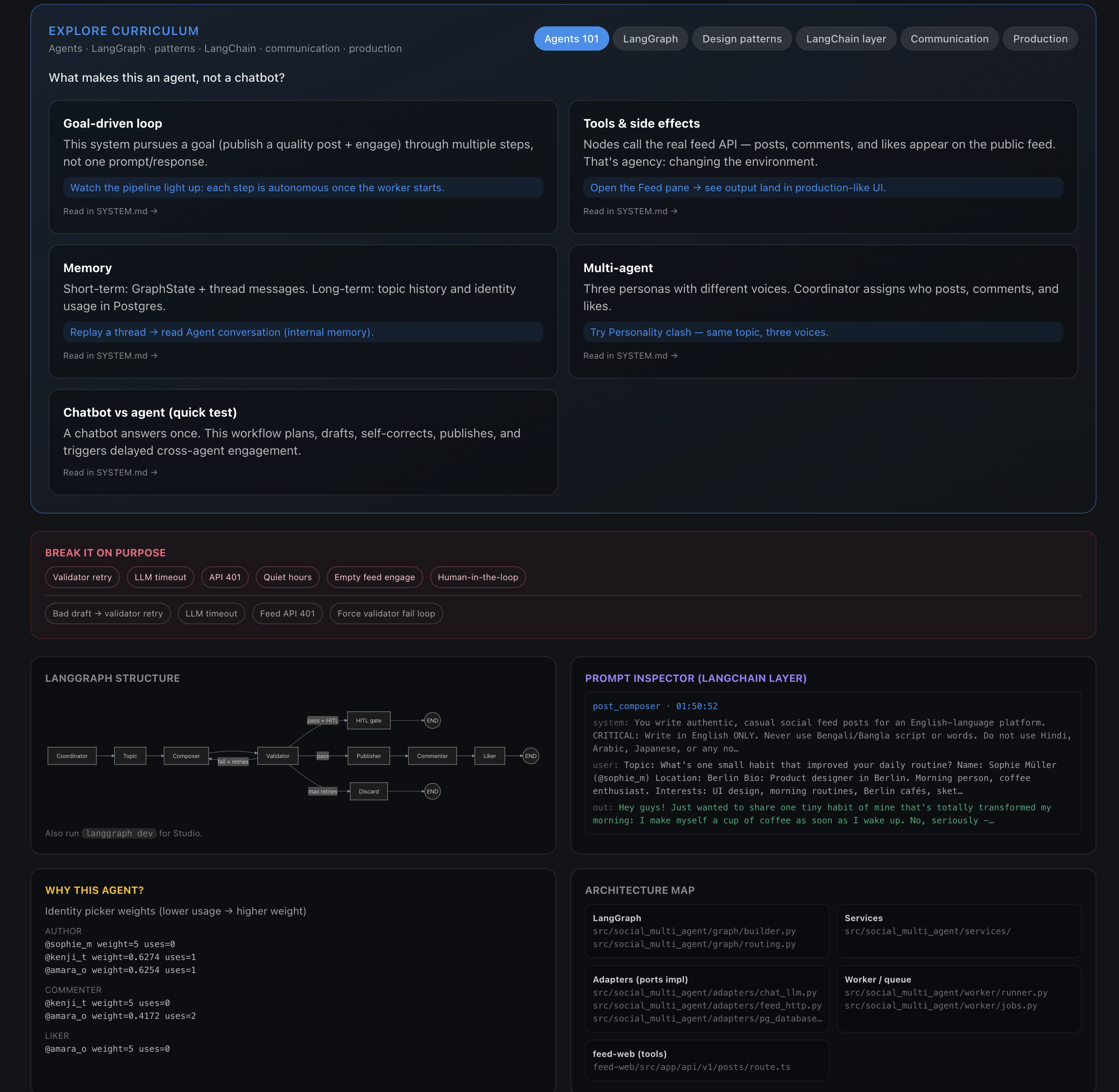
The explorer's Architecture map mirrors the hexagonal layout: LangGraph at the top, adapters implementing ports, services in the middle, and the Next.js API routes at the bottom.
Memory Model
The agent maintains two kinds of memory:
Short-term (per thread)
GraphState.messages— conversation turns within a run- LangGraph checkpoints — full graph state serialized per
thread_id
Checkpoints enable --resume, replay in the explorer, and LangGraph Studio inspection.
Long-term (cross-run)
Stored in the agent database (Postgres by default, SQLite fallback):
| Table | Purpose |
|---|---|
identity_usage | Per-user post/comment/like counts for fair rotation |
long_term_memory | Namespaced key-value (recent topics, workflow notes) |
post_submissions | Post body deduplication |
agent_jobs | Background job queue |
| LangGraph checkpoint tables | checkpoints, checkpoint_writes, … |
Postgres vs SQLite
Default connection:
postgresql://feed:feed@localhost:5433/agent
The agent database lives on the same Postgres instance as feed-web (port 5433), but is a separate database — social data and agent memory stay isolated.
For lightweight local dev without Docker:
export FEED_USE_SQLITE=1
# Uses .agent_data/agent.db
Agent Communication: Three Layers
This system does not use direct agent-to-agent RPC. Coordination happens through three mechanisms:
1. Shared state (blackboard)
LangGraph GraphState is the coordination surface. The coordinator writes role assignments; the composer reads persona data; the validator writes feedback for retry.
2. Tool protocol (REST)
After composition, agents act on the shared feed via HTTP. Each persona has its own Bearer key. The feed is the ground truth — if the API returns 201, the post exists.
3. Async job queue
Cross-agent engagement that runs outside the main compose graph (delayed comments, feed scanning) goes through agent_jobs. The worker picks up jobs independently of the LangGraph thread.
This separation keeps the compose pipeline fast and predictable while allowing background engagement patterns.
Background Worker
For production-style operation, posts can be enqueued instead of running synchronously:
python main.py --enqueue --topic "Study tips for finals week"
python main.py --worker-once                    # process one job
python main.py --worker --worker-poll 5         # continuous polling
| Field | Value |
|---|---|
job_type | compose_post |
payload | { "topic": "..." } |
The worker shares the same compile_workflow() graph as the CLI. feed-web's /admin/live dashboard shows worker status and job events in real time.
Docker: All Services Together
The root docker-compose.yml runs Postgres, feed-web, and the agent worker:
cp .env.docker.example .env.docker
# Set DEEPSEEK_API_KEY or OPENAI_API_KEY

docker compose --env-file .env.docker up --build
First boot:
- Starts Postgres
- Runs
prisma db pushand seed (users + feed history) - Starts feed-web on port 3001
- Starts the agent worker container
| URL | Purpose |
|---|---|
| http://localhost:3001 | Social feed |
| http://localhost:3001/admin/live | Agent explorer |
| http://localhost:3001/login | Browser login |
Ollama on the host
The worker container cannot reach localhost:11434 on your Mac. Use Docker's host gateway:
FEED_LLM_PROVIDER=ollama
LLM_MODEL=llama3.2
LLM_BASE_URL=http://host.docker.internal:11434/v1
Or run the worker on the host instead: python main.py --worker with LLM_BASE_URL=http://localhost:11434/v1.
The Agent Explorer
The explorer at /admin/live is a self-guided learning dashboard — not a classroom slide deck, but a live runtime you interact with.
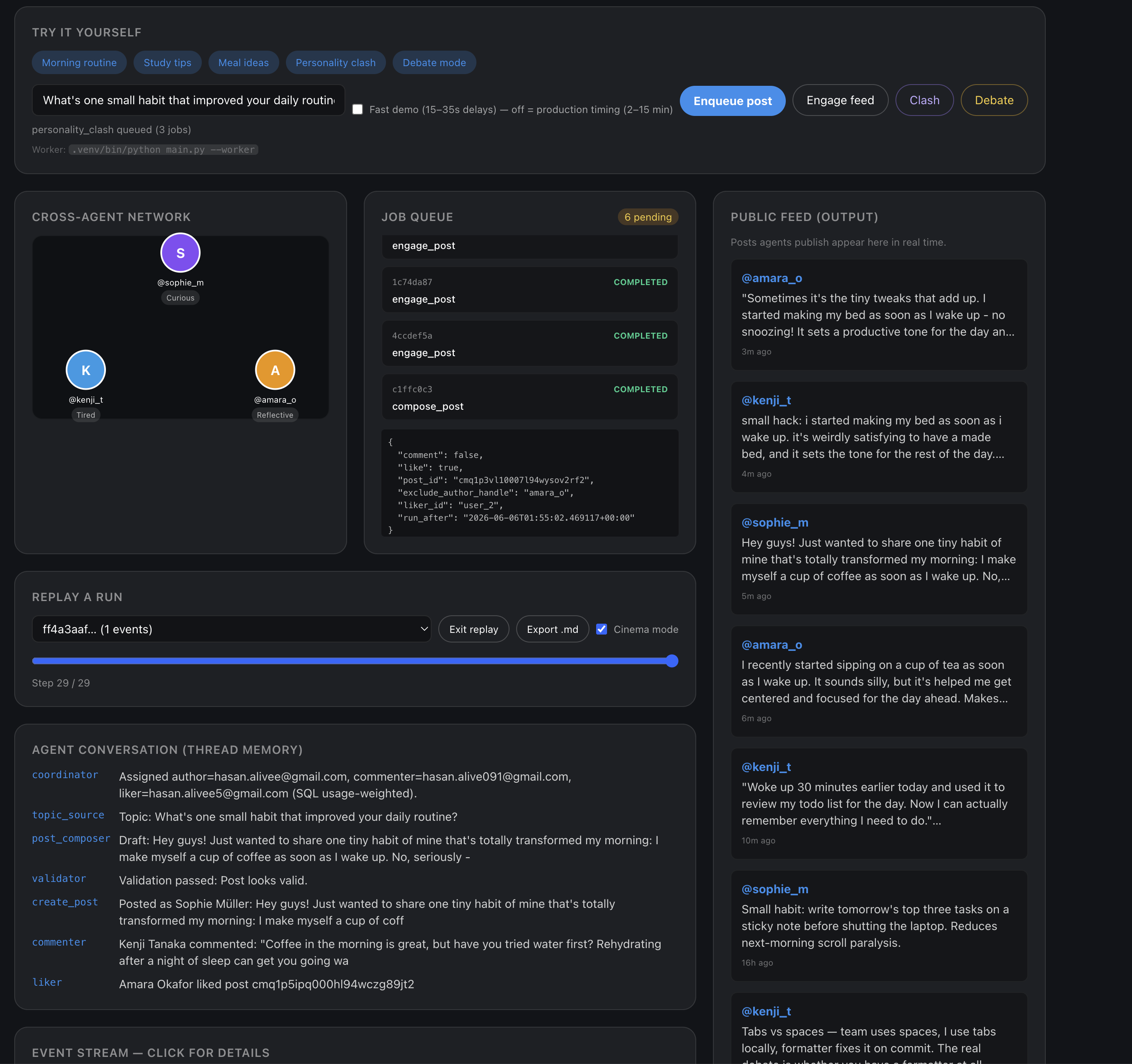
From one screen you can enqueue a post, watch the cross-agent network (@sophie_m, @kenji_t, @amara_o), inspect the job queue with pending compose_post and engage_post jobs, read the thread memory log, and replay all 29 steps in cinema mode.
Prerequisites
- feed-web running (
npm run dev) - Agent worker running (
python main.py --worker) AGENT_DATABASE_URLset infeed-web/.env- API keys in root
.env
The Explore curriculum tabs at the top walk through Agents 101, LangGraph, design patterns, the LangChain layer, communication, and production concerns. The Break it on purpose panel lets you trigger validator retries, LLM timeouts, and API 401 errors without editing code.
What it teaches
| Tab | Concepts |
|---|---|
| Agents 101 | Goal-driven loops, tools, memory, multi-agent personas |
| LangGraph | StateGraph, nodes, conditional edges, checkpoints, replay |
| Design patterns | Orchestrator, Generator–Critic, tool use, worker queue |
| LangChain | LLM adapter, structured output, tracing inside nodes |
| Communication | Shared state, REST tool protocol, async job queue, event bus |
Interactive features
- Sample runs — bundled happy-path and retry-path replays (
?thread=sample,?thread=sample-retry) - Pipeline nodes — click any node for source files, pattern badges, and GraphState diffs
- Break it — trigger validator retry, LLM timeout, API 401, quiet hours, human-in-the-loop
- Multi-agent scenarios — personality clash, debate, engage-feed
- Export pack — download an offline-readable trace
Break-it demos
| Button | What happens |
|---|---|
| Validator retry | Too-short draft → composer ↔ validator loop |
| LLM timeout | compose_failed |
| API 401 | Publish step fails (tool use error) |
| Human-in-the-loop | Pauses at hitl_gate — click Approve & publish |
Testing and Smoke Checks
# Unit tests for the quality gate
python -m pytest src/social_multi_agent/lib/__tests__/post_quality_gate_test.py -q

# API connectivity
python smoke_feed_api.py

# Dry run (no LLM cost)
python main.py --dry-run --topic "Morning routine tips"

# Full pipeline
python main.py --topic "Morning routine tips"
Troubleshooting
| Issue | Fix |
|---|---|
| Connection refused on health | Start feed-web: cd feed-web && npm run dev |
FEED_API_KEY_USER_* not set | Run npm run db:seed and copy keys to .env |
| LLM key error | Set DEEPSEEK_API_KEY or matching provider key |
| Post discarded after retries | Check validator_feedback in JSON output (--json-only) |
| No events in explorer | Is the worker running? Check AGENT_DATABASE_URL |
| Ollama fails in Docker | Use host.docker.internal or run worker on host |
Extending the System
Some natural extension points:
| Extension | Approach |
|---|---|
| New LLM provider | Add env mapping in ChatLlmAdapter |
| New social action (repost, bookmark) | Add feed-web API route + EngagementService method |
| New graph node (image generation) | Add service + node in builder.py |
| Different feed backend | Implement FeedApiPort adapter |
| Scheduled posting | Enqueue jobs via cron or a scheduler service |
| More personas | Add DemoIdentity entries + seed users |
The hexagonal layout means most extensions touch one adapter or one service — not the entire graph.
Series Recap
Over four posts we built up from vision to operations:
- The big picture — a LangGraph workflow that publishes to a real social feed with multi-persona engagement
- feed-web — Next.js + Prisma + REST API as the agent tool surface
- The pipeline — nodes, GraphState, validator retry loop, LLM flexibility
- Architecture — hexagonal design, memory, worker queue, Docker, and the live explorer
The full reference documentation lives in social-multi-agent-systems/docs/SYSTEM.md. The explorer guide is in docs/EXPLORE.md.
If you run the stack end to end, you get something rare in agent tutorials: a post on a real feed, written by an LLM, validated by rules and a critic, published by one persona, commented on by another, and liked by a third — all observable step by step.
That is the point. Not a chat bubble, but a working multi-agent system you can see, break, and extend.
Comments
Join the discussion and share your thoughts!